
html 字体图标生成和下载(方便、快捷、实用)
【写在前面:有时为了找个合适图标,花费较多时间,刚好有个网络字体库 fontAwesome,通过反复研究转码成功,可用来做图标,改改颜色,保存 ico 即可】
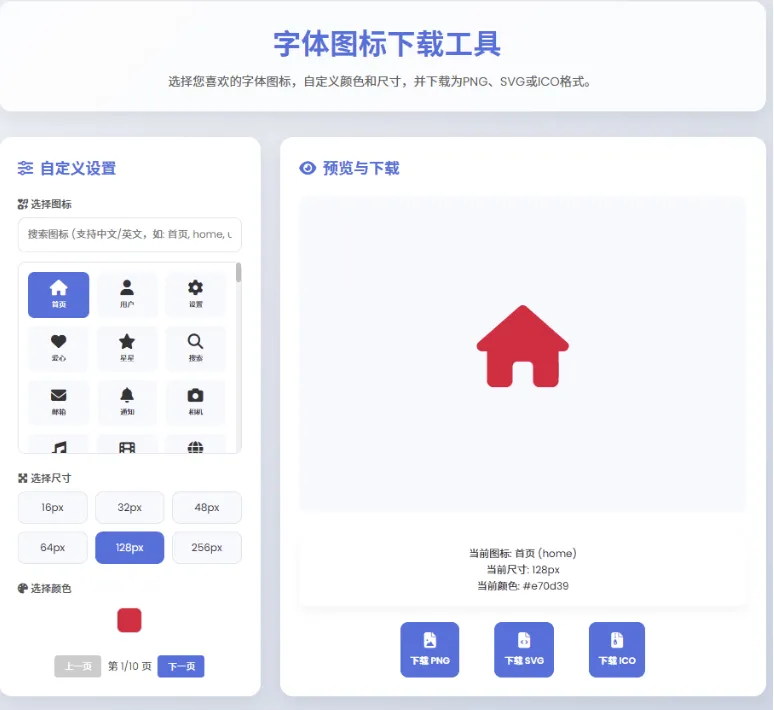

功能介绍
图标:常用字体图标 500 个,每页 100 个,因当前字体免费版本限制,个别可能显示为网络。
搜索:支持中文搜索,为全部范围搜索。
尺寸:16×16、32×32、48×48、64×64、128×128、256×256
颜色:调色板选择颜色
预览:根据尺寸和颜色预览,备注:当前颜色、当前尺寸、当前颜色(如 #e70d39)
保存:支持 png、svg、ico 格式,ico 自动为透明背景色。
关键代码
// 下载 PNG async function downloadPNG() {const loadingIndicator = document.getElementById('loadingIndicator'); loadingIndicator.style.display = 'block'; try {const canvas = await createIconCanvas(selectedSize); // 创建下载链接 const link = document.createElement('a'); const iconName = selectedIcon.replace('fa-', ''); const chineseName = iconChineseNames[selectedIcon] || iconName; link.download = `fontawesome-${chineseName}-${selectedSize}px.png`; link.href = canvas.toDataURL('image/png'); link.click(); loadingIndicator.style.display ='none';} catch (error) {console.error(' 生成 PNG 文件时出错:', error); loadingIndicator.style.display ='none'; alert(' 生成 PNG 文件时出错,请重试 '); } } …… // 下载 ICO async function downloadICO() {const loadingIndicator = document.getElementById('loadingIndicator'); loadingIndicator.style.display ='block'; ……html 软件(含字体库),解压到文件夹,双击浏览器打开即可使用。